Beyond the Context Window: How LangChain Architecture Prevents Context Exhaustion in Long-Running AI Agents
Learn how LangChain, LangGraph, retrieval-augmented generation, context compaction, state management, and subagent architectures address context exhaustion in long-running AI agents.

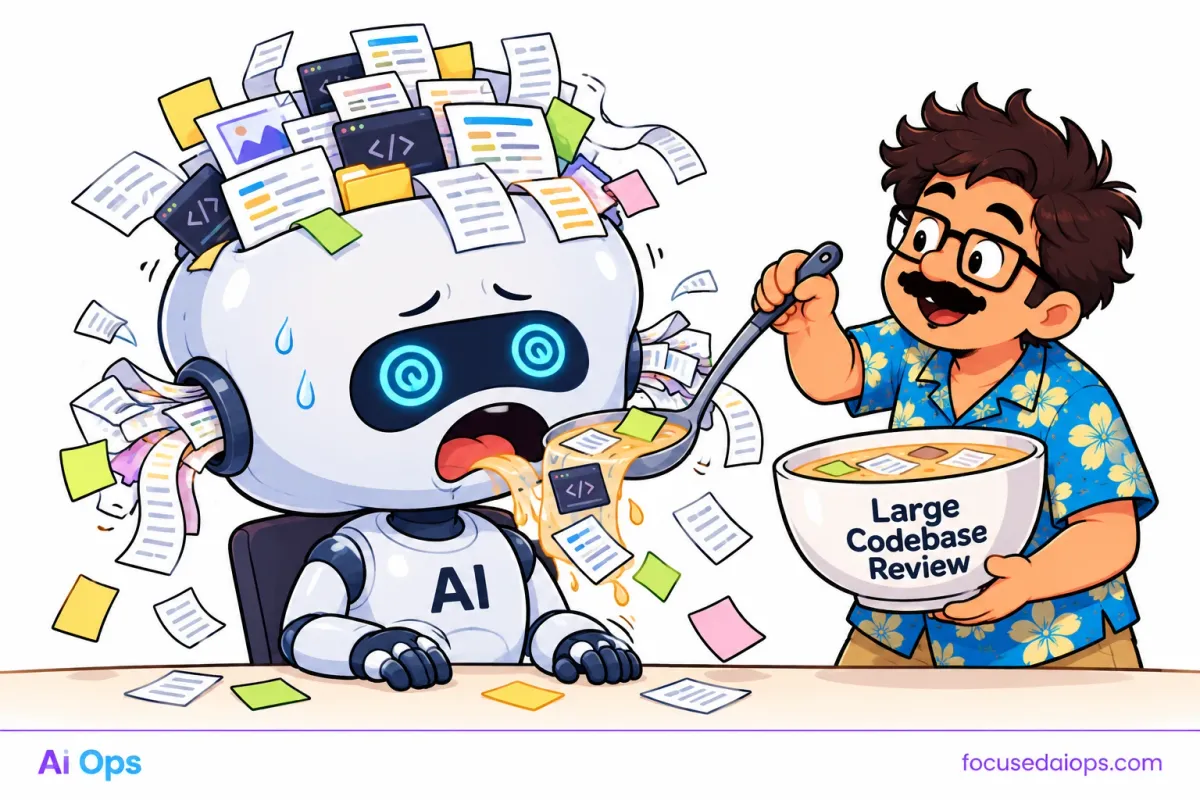
Large language models have a finite context window. Every instruction, conversation message, retrieved document, tool result, and generated token consumes part of that capacity. When an AI agent operates over long sessions or complex workflows, its context can become overloaded, incomplete, or ineffective.
Increasing the context window does not solve the underlying problem. Larger windows cost more to process, and more context does not guarantee better reasoning. An agent can have access to thousands of tokens and still miss the critical instruction buried inside them.
LangChain and LangGraph provide architectural components for managing this problem. They help developers control what enters a model's context, preserve workflow state, retrieve relevant information, and maintain continuity across long-running tasks.
The important distinction is that these frameworks do not remove model context limits. They help developers design systems that operate within those limits.
Understanding Context Exhaustion
A model's context window is the maximum amount of input and output tokens it can handle in a single invocation, subject to the model's specific limits.
A token is a unit of text processing. It may represent a complete word, part of a word, punctuation, or another text fragment.
Consider an enterprise AI agent investigating a production incident. Its workflow may accumulate:
- System instructions and security policies.
- Conversation history.
- Logs from multiple services.
- Database query results.
- Monitoring metrics.
- Retrieved runbooks and documentation.
- Tool execution results.
- Intermediate reasoning and task state.
Each component competes for the same finite context budget.
Context exhaustion creates several failure modes.
Hard overflow: The assembled request exceeds the model's context limit and fails or requires truncation.
Context dilution: The prompt contains so much information that important details become harder for the model to use reliably.
Instruction interference: Old messages, irrelevant tool outputs, or conflicting instructions distract from the current task.
Lossy summarization: Important identifiers, constraints, exceptions, or dependencies disappear when a long history is compressed into a summary.
State loss: The agent forgets which actions have completed, which resources it has inspected, or which decisions it has already made.
These problems are related but not identical. A system can remain below the token limit and still produce poor results because its context contains the wrong information.
Context Engineering: Select Information, Not Just More Tokens
Context engineering is the process of deciding which information a model receives for a specific task.
Instead of sending the entire conversation and every available document to the model, the application constructs a smaller, task-specific context.
A useful context budget can be represented as:
Available context = model context limit − reserved output tokens − safety margin
The remaining capacity must accommodate system instructions, user input, retrieved information, conversation history, and tool results.
For example, assume an application uses a model with a 32,000-token context limit. The developer reserves 4,000 tokens for output and 2,000 tokens as a safety margin. That leaves approximately 26,000 tokens for input.
The application should not automatically fill all 26,000 tokens. It should select only the information needed to perform the current operation.
A practical context assembly pipeline looks like this:
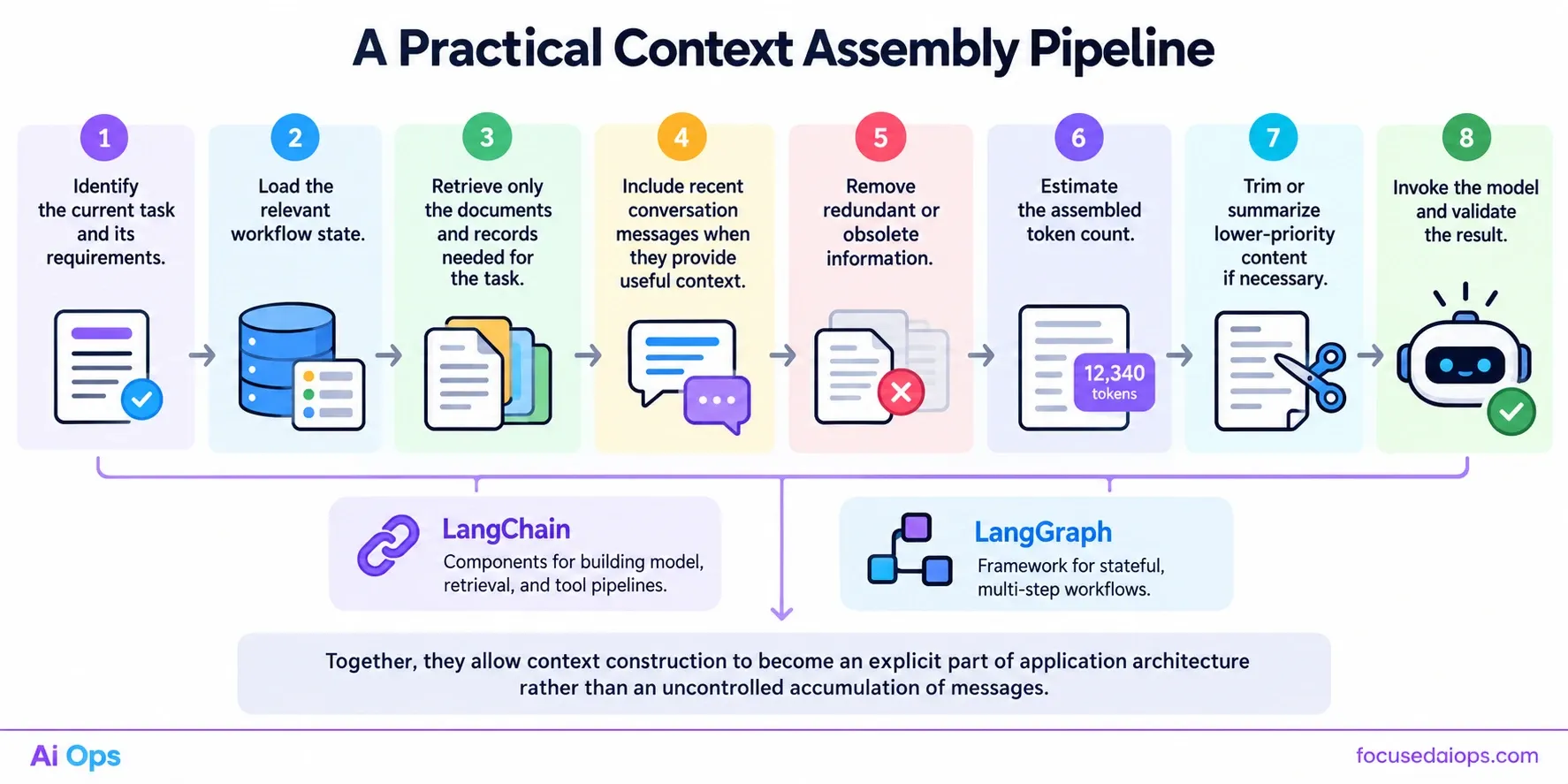
- Identify the current task and its requirements.
- Load the relevant workflow state.
- Retrieve only the documents and records needed for the task.
- Include recent conversation messages when they provide useful context.
- Remove redundant or obsolete information.
- Estimate the assembled token count.
- Trim or summarize lower-priority content if necessary.
- Invoke the model and validate the result.
LangChain provides components for building model, retrieval, and tool pipelines. LangGraph provides a framework for managing stateful, multi-step workflows. Together, they allow context construction to become an explicit part of application architecture rather than an uncontrolled accumulation of messages.
LangGraph: Separate Workflow State From Model Context
One of the most important architectural decisions is to separate what the application remembers from what the model sees in a particular invocation.
These are different responsibilities.
Workflow state may contain task identifiers, completed actions, investigation findings, retrieved document references, approval status, and execution checkpoints. The model needs only the subset relevant to its current operation.
LangGraph models workflows as graphs composed of nodes and transitions. A node performs a defined operation, such as retrieving records, calling a tool, evaluating a result, or generating a response.
State passes between nodes, allowing the application to preserve structured information throughout a workflow.
For example, an incident investigation graph might contain these nodes:
classify_incident: Identify the incident category and severity.retrieve_runbook: Fetch the relevant operational procedure.query_metrics: Retrieve targeted monitoring data.analyze_findings: Interpret the evidence.validate_hypothesis: Check whether the evidence supports the suspected cause.prepare_response: Produce a summary and recommended actions.
Each node can receive the state it needs and update the information required by subsequent nodes.
The analysis node does not need every raw log line collected during the investigation. It may need only the relevant error patterns, timestamps, service identifiers, and metric anomalies.
The response node may need the confirmed findings, impact, actions taken, and unresolved risks, but not the full output of every previous tool call.
This architecture prevents the model prompt from becoming a complete transcript of the workflow.
Checkpointing and persistence
LangGraph supports checkpointing, which saves graph state at defined points during execution. Depending on the configured persistence layer, the application can resume a workflow after interruption and retain information across separate invocations.
Checkpointing is not the same as preserving a complete, useful model context. A saved state can contain far more information than should be placed in the next prompt.
The application must still decide which fields to load, transform, summarize, or retrieve before invoking the model.
Persistence preserves workflow continuity. Context construction determines what the model receives.
Message Trimming and Summarization
Long-running conversations can accumulate thousands of tokens. LangChain applications can use message-processing logic to control how much history reaches the model.
Two common techniques are trimming and summarization.
Message trimming
Trimming removes messages that are no longer necessary for the current operation.
A simple strategy retains recent messages while excluding older exchanges. A more advanced strategy preserves system instructions and critical decisions while removing redundant discussion and obsolete tool output.
However, trimming only by message count is unreliable. A single tool response may contain more tokens than dozens of short messages.
A robust implementation should consider token counts and message importance.
Illustrative pseudocode:
def build_context(messages, token_budget):
    selected = []
    used_tokens = 0

    for message in reversed(messages):
        cost = estimate_tokens(message)

        if used_tokens + cost > token_budget:
            continue

        selected.append(message)
        used_tokens += cost

    return list(reversed(selected))
This example illustrates a basic token-budgeting approach. Production code should handle system instructions separately, account for message formatting overhead, and prioritize important information instead of treating every message equally.
Summarization
Summarization replaces a large body of history with a shorter representation.
For example, an incident investigation may compress several hundred log entries into a structured finding:
{
  "service": "payments-api",
  "incident_window": "10:42-10:49 UTC",
  "observed_issue": "Elevated database connection timeouts",
  "correlated_signal": "Connection pool utilization reached 98%",
  "actions_completed": [
    "Reviewed database metrics",
    "Checked deployment history"
  ],
  "unresolved_question": "Whether the latest deployment increased connection demand"
}
This representation is more useful for the next investigation step than repeatedly passing the complete logs.
However, summaries are lossy. They can omit details that later become important.
Preserve critical facts as structured data rather than relying entirely on natural-language summaries. Store identifiers, timestamps, numerical measurements, explicit constraints, decisions, and unresolved questions in fields that can be retrieved independently.
For high-stakes workflows, retain links to the original evidence so the agent can inspect it again when necessary.
Retrieval-Augmented Generation: Load Knowledge on Demand
Retrieval-augmented generation (RAG) retrieves relevant information from an external knowledge source and adds selected results to the model's context.
Instead of loading an entire company knowledge base into every request, an application searches for documents related to the current task.
A typical RAG pipeline includes:
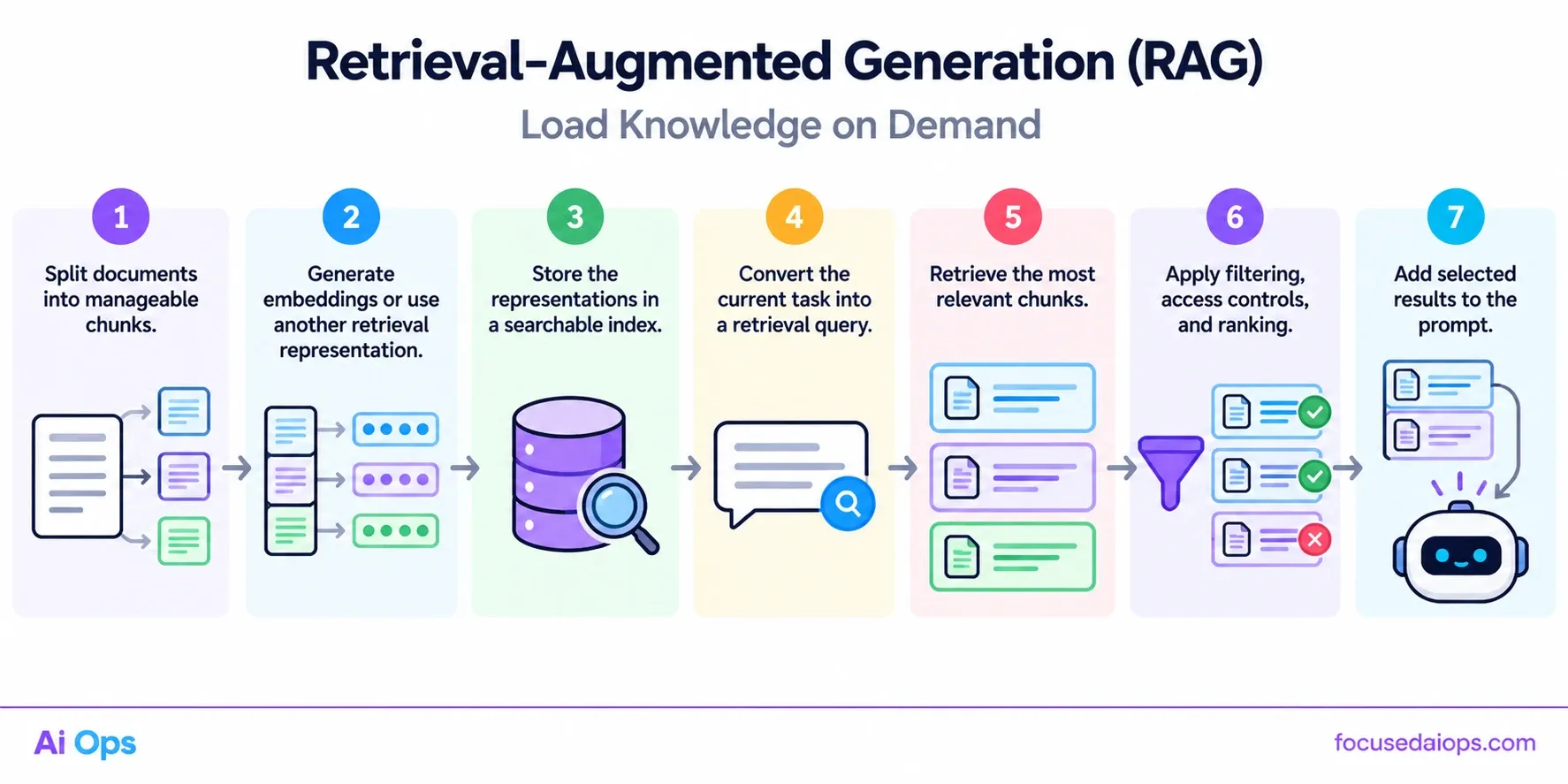
- Split documents into manageable chunks.
- Generate embeddings or use another retrieval representation.
- Store the representations in a searchable index.
- Convert the current task into a retrieval query.
- Retrieve the most relevant chunks.
- Apply filtering, access controls, and ranking.
- Add selected results to the prompt.
For example, a healthcare operations agent investigating a failed integration might retrieve only the relevant interface specification, error-handling procedure, and approved troubleshooting guide.
It should not load every hospital policy, integration document, and historical incident.
Retrieval quality matters as much as retrieval quantity. Returning 100 weakly related chunks can create more context problems than returning five highly relevant ones.
A production system should enforce:
- A maximum token budget for retrieved content.
- Document-level access controls.
- Relevance thresholds and deduplication.
- Source identifiers and metadata.
- Version and freshness checks.
- Traceability to the original documents.
Retrieval also introduces risks. An irrelevant document can mislead the model, while malicious instructions embedded in retrieved content can attempt to manipulate the agent. Retrieved text must be treated as data, not automatically trusted as an instruction.
RAG reduces the need to preload knowledge, but it does not guarantee that the correct information will be retrieved. Retrieval quality must be measured and tested.
Tool Outputs: Store Large Results Outside the Prompt
Tool calls are a common source of context exhaustion.
An agent may execute a database query that returns thousands of rows, inspect a large source file, or retrieve several megabytes of logs. Passing the entire output into the next model invocation wastes tokens and can obscure the relevant evidence.
A better approach separates the tool result from the information required for the next decision.
For example, a database tool could return:
{
  "result_id": "query-8f21",
  "row_count": 18432,
  "columns": [
    "timestamp",
    "service",
    "error_code"
  ],
  "summary": {
    "unique_errors": 12,
    "most_common_error": "DB_POOL_TIMEOUT"
  },
  "artifact_uri": "internal://investigations/query-8f21"
}
The full dataset remains in controlled storage. The model receives the summary and a reference that the application can use to retrieve specific records later.
This pattern is useful for:
- Database query results.
- Application logs.
- Source code and repository files.
- Large API responses.
- Generated reports.
- Monitoring time series.
- Long documents and transcripts.
The application should store artifacts securely, enforce authorization when retrieving them, and apply appropriate retention policies.
Do not assume that a URI is meaningful to the model by itself. The application must provide a tool or retrieval mechanism that can resolve the reference when further inspection is needed.
Deep Agents and Filesystem-Based Workflows
Some tasks are too large for a single prompt or a simple sequence of model calls. Repository analysis, complex research, and multi-stage engineering work may require persistent plans, intermediate artifacts, and delegated subtasks.
The Deep Agents ecosystem builds on LangChain and LangGraph concepts to support more structured agent workflows. Depending on the implementation, these workflows can use planning, filesystem operations, subagents, and memory mechanisms.
A filesystem-based approach lets an agent write intermediate findings to files instead of keeping every detail in its active conversation.
For example, a code-analysis agent could maintain:
plan.md— the current plan and remaining tasks.findings.md— verified findings and evidence references.dependencies.json— relevant dependencies and versions.open_questions.md— unresolved issues.final_report.md— the final deliverable.
The active context contains the current objective, relevant findings, and the next action. The agent reads other artifacts only when needed.
Subagents can also divide work. One agent may inspect database migrations while another analyzes API behavior. A coordinating agent then receives their concise findings rather than the complete interaction histories.
Delegation does not automatically reduce total cost or eliminate context problems. Subagents can duplicate work, produce inconsistent results, or return oversized summaries. Each delegated task needs a clear scope, defined output format, and token limit.
Persistent artifacts also require security controls. File access should be scoped to the task, and sensitive data should not be exposed to agents that do not need it.
A Reference Architecture for Context-Aware Agents
A robust long-running agent can use the following architecture:
User request → Task classifier → State loader → Context builder → Model invocation → Tool execution → State update → Checkpoint
The context builder is the key control point. It assembles the next prompt from:
- Current task instructions.
- Relevant workflow state.
- Selected conversation history.
- Retrieved knowledge.
- Compact tool outputs.
- Explicit constraints and required output format.
After the model responds, the application validates the response and determines whether another tool call, retrieval step, or workflow transition is required.
Large intermediate results are stored outside the prompt. Checkpoints preserve execution progress. Retrieval loads evidence when needed. Summaries reduce repetitive history, while structured state preserves critical facts.
A simplified context allocation might look like this:
| Component | Example budget |
|---|---|
| System instructions and policies | 2,000 tokens |
| Current task and user input | 1,500 tokens |
| Relevant workflow state | 2,500 tokens |
| Retrieved documents | 8,000 tokens |
| Recent conversation | 3,000 tokens |
| Tool results and evidence summaries | 4,000 tokens |
| Additional input headroom | 5,000 tokens |
| Reserved output capacity | 6,000 tokens |
| Total | 32,000 tokens |
These figures are illustrative, not universal defaults. The appropriate allocation depends on the model, task, tool overhead, and required response length.
The context builder should also account for differences in tokenization, message formatting, multimodal inputs, and provider-specific limits. Token estimates are useful, but the application should still handle context-limit errors safely.
Common Architectural Mistakes
Sending the entire conversation every time. This increases cost and allows irrelevant history to accumulate. Select messages based on relevance and importance.
Treating a larger context window as the complete solution. Larger windows can delay overflow, but they do not fix poor retrieval, conflicting instructions, or unnecessary data.
Summarizing everything indiscriminately. Generic summaries can discard critical evidence. Preserve exact values, identifiers, constraints, and source references separately.
Using fixed message counts instead of token budgets. Messages vary significantly in length. Estimate token usage before constructing the prompt.
Storing all state in natural-language memory. Free-form summaries are difficult to validate and may lose important details. Use structured state for operational facts.
Trusting retrieved content without validation. Retrieval can return stale, irrelevant, or malicious content. Apply authorization, source checks, and prompt-injection defenses.
Ignoring context metrics. Without measurements, developers cannot determine whether failures result from context pressure, retrieval quality, model limitations, or tool errors.
Measuring Context Exhaustion
Context management should be evaluated as part of the agent's operational performance.
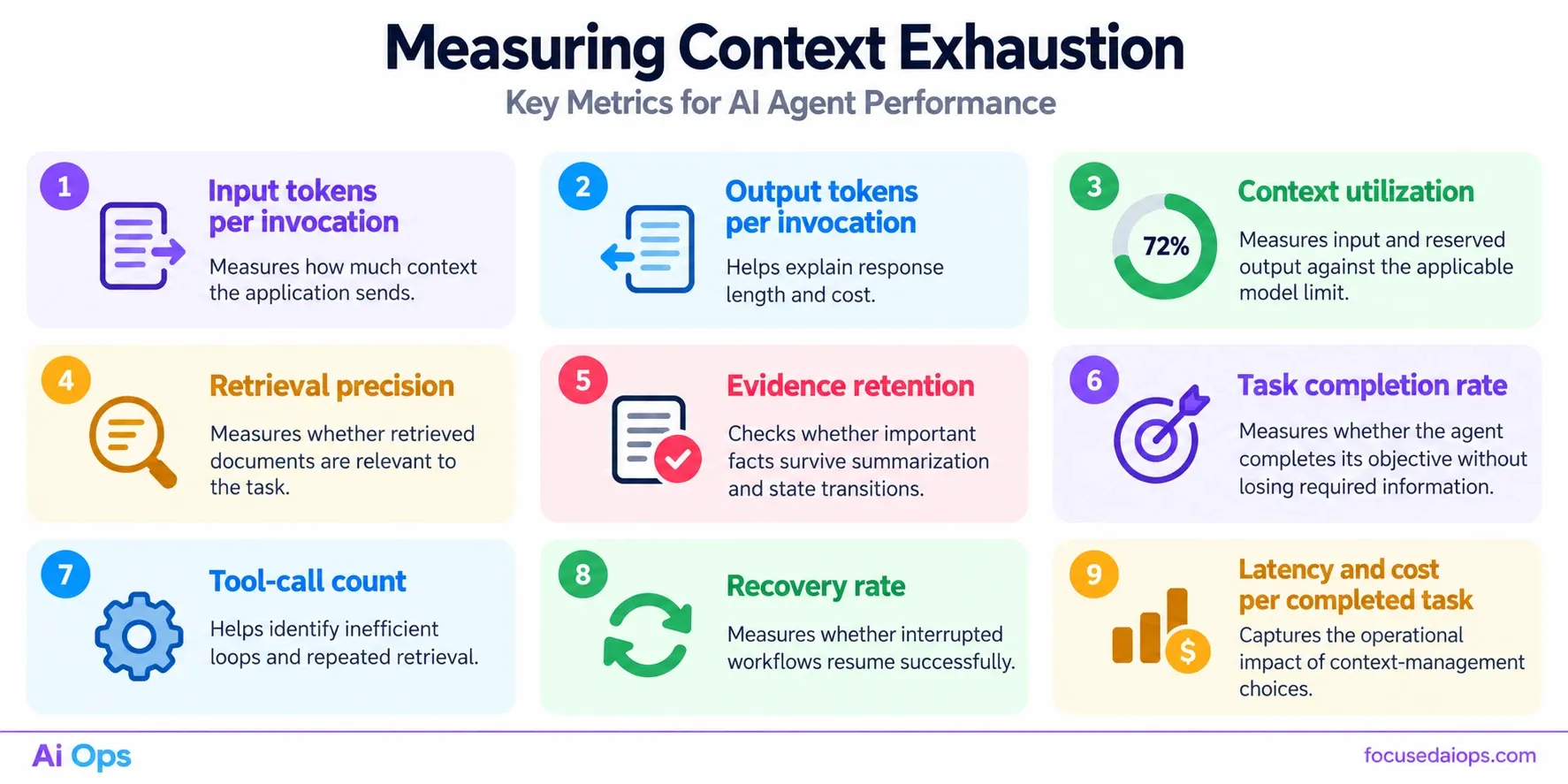
Track these metrics:
- Input tokens per invocation: Measures how much context the application sends.
- Output tokens per invocation: Helps explain response length and cost.
- Context utilization: Measures input and reserved output against the applicable model limit.
- Retrieval precision: Measures whether retrieved documents are relevant to the task.
- Evidence retention: Checks whether important facts survive summarization and state transitions.
- Task completion rate: Measures whether the agent completes its objective without losing required information.
- Tool-call count: Helps identify inefficient loops and repeated retrieval.
- Recovery rate: Measures whether interrupted workflows resume successfully.
- Latency and cost per completed task: Captures the operational impact of context-management choices.
Test the system using long conversations, oversized tool responses, irrelevant documents, interrupted executions, conflicting historical messages, and tasks that require facts from earlier stages.
The goal is not to minimize tokens at all costs. It is to minimize unnecessary context while preserving the information required for correct decisions.
Conclusion
Context exhaustion is an architectural problem, not just a model limitation.
LangChain provides components for composing model, tool, and retrieval workflows. LangGraph adds stateful execution and checkpointing for multi-step applications. Retrieval-augmented generation loads knowledge on demand, while structured state, summarization, and external artifacts keep prompts focused.
Deep Agents can extend these patterns for complex tasks that require planning, filesystem-based work, and delegation.
None of these components automatically guarantees reliable context management. Developers must decide what to persist, what to retrieve, what to summarize, and what to send to the model at each step.
For enterprise AI systems, these decisions affect accuracy, latency, cost, security, and recoverability. A well-designed agent does not remember everything in every prompt. It preserves the information needed to continue the work and retrieves the right evidence when the task demands it.
Focused AiOps helps enterprises design secure, context-aware AI systems around proprietary data, private infrastructure, and controlled workflows. From retrieval architecture to autonomous operations, the objective is to build AI systems that remain useful and governable as workloads grow.
Own Your Intelligence. Protect Your Advantage!
Technical References
- LangChain Documentation — Learn LangChain
- LangGraph Documentation — Thinking in LangGraph
- Deep Agents Documentation — Overview
- LangGraph Documentation — Official Documentation
- LangChain Documentation — Retrieval